Biplab Anand. Powered by Blogger.

Time

RSS

Find Windows XP CD Key Inside the OS CD

Ever you thought that the CD-Key of the window XP disc you were looking for was just Right under your nose .I mean to say the product key of your windows Xp is right on the cd. Let see how easily we can get it..

To get the Windows XP CD key, you have to do the following steps. Just follow the instruction given below and find the product key into your Windows XP CD.

* Bring your Windows XP CD and insert it into your Computer's CD/DVD Rom.

* Now, open your Windows XP CD and find the folder name I386.

* Inside the folder I386, find the file named as unattended.txt . ( you can search it)


* Open unattended.txt by using notepad.


* Finally, keep scrolling of the open notepad file and you will get Windows XP CD Key.


In this way you can get the windows XP CD key into your Windows XP CD. The People who are not wish to buy XP or the people who lost the serial key of Windows XP CD, can find the Windows XP CD key in this way.

Enjoy!!!!!!!

  • Digg
  • Del.icio.us
  • StumbleUpon
  • Reddit
  • RSS

Show Hidden Files and Folders in XP


For Those Who Have having problem of not showing Hidden files. Simply follow the following steps to unable the show hidden files Options

* Open registry ( go to window+run = type regedit and enter)

* In the left pane go to path HKEY_LOCAL_MACHINESoftware\\Microsoft
\Windows\\CurrentVersion\\Explorer\\Advanced

* Delete the value CheckedValue in the Right pane by right clicking it and
selecting delete.( type should be REG_SZ and data should be 2.)

* Create a new DWORD value called CheckedValue by right clicking in the right
pane and then selecting new ->DWORD Value and then changing the name to
CheckedValue. (same as above,except that the type is REG_DWORD).modify
the value data to 1(0x00000001) by right clicking the CheckedValue in
the right clicking the CheckedValue in the Right Pane and selecting modify and
hanging the value data to 1.

This should let you change the "Hidden files and folders" option


Enjoy!!!!!!!!!!

  • Digg
  • Del.icio.us
  • StumbleUpon
  • Reddit
  • RSS

Using a Proxy to Bypass Site Ban, Country Ban and Surf Anonymously by Hiding your Network IP

There is too many internet sites which can bypass and help you to surf internet anonymously but here i helped you to surf anonymously with these website.
Hide my ass (
http://www.hidemyass.com/ ) is an advanced yet simple to use application which anonymously encrypts your entire internet connection.Access any blocked website through Hidemyass and your internet connection will be encrypted and your IP address (and in some cases your country) will be virtually changed with just a click of a button.There are other proxies you can find by googling or through any other search engine for free like http://netbreast.com/#pronx but Hidemyass work best for anonymous surfing.


enjoy!!!!!!!!


  • Digg
  • Del.icio.us
  • StumbleUpon
  • Reddit
  • RSS

Happy Vijaya Dashain to All My Blog Visitors

The Big and National festival of Nepal Vijaya Dashain.A very cool wishes to my all blog visitors and all around the world people .The most awaited festivals of all Nepalese. May God Durga give you happiness, peace and fulfill all of your dream.

Enjoy!!!!!!

  • Digg
  • Del.icio.us
  • StumbleUpon
  • Reddit
  • RSS

How To Delete/Deactivate Your Facebook Account

If You are really Bored or hang with Facebook and searching for the way how to delete your Facebook Account it is easy and done in simple steps. Since many of you folks are searching for ways to actually delete your account on Facebbok or at least take a break from it, I just thought making lives easier. Therefore we have a link to help users with quitting Facebook. Trust me, if you haven’t yet been able to grasp the Privacy settings, etc it is time you wave it good bye. I am not forcing you to delete the account, but it is obvious that you aren’t enjoying your time on the network and since privacy is of utmost importance, you should quit it.and the way is down just click on the given link.

https://ssl.facebook.com/help/contact.php?show_form=delete_account


Enjoy!!!!!!

  • Digg
  • Del.icio.us
  • StumbleUpon
  • Reddit
  • RSS

Turn Your Status Upside Down

If you feel sad to see everything being upright and fine and want to make a difference yourself, on at least your Facebook status? Well you can do that at least with Flip Text. You just have to visit http://www.fliptext.org/ and enter your text, the tool converts your texts upside down in real time. Type in as much as you can and click on the Facebook tab to update your status. Many would find this act to be stupid, but hey, who cares? It’s good to act stupid at times.


Enjoy!!!!!!

  • Digg
  • Del.icio.us
  • StumbleUpon
  • Reddit
  • RSS

Update Facebook Status Using Yahoomail,Hotmail and Gmail

You can update your facebook status using yahoomail,hotmail and gmail account. it is too easy to do so from your email accounts, here we go how we can update the facebook status.

Using Yahoo Mail

* First open your yahoo account

* After opening the yahoo account there is a status bar, in the status bar yahoo is already merge
there and u have to merge your facebook account with your account.


* Click on facebook icon, a new windows is open then you have to put your facebook id and
password on it and sign in .


* Facebook permission box open, you have to allow there that's it your facebook account is
merged with your yahoo account successfully only you have to continue in next page.


* Enjoy!!!!!!!!


Using Hotmail

* First open your facebook account

* In the facebook search tab type Windows Live Messenger Application and like the application
after liking the application go to application.


* Request for Permission box open allow the application,in another box click continue.


* The page redirected to you to hotmail ,enter your username and password to sign in to
hotmail.


* After signing on to hotmail the connect to facebook box open then you have to click on connect
with facebook.


* A new box open click allow then a new box open ,in the box go to setting and manage the
setting with tick the small two boxes.


* Thats it now you can update the facebook status with the hotmail. some setting requires in
hotmail go to hotmail profile and fill the connect with facebook tab.


* Enjoy!!!!!!!!

Using Gmail

* Open your Gmail account in standard view

* Go to gmail setting and then go to labs


* In labs there is enable the Add any gadgets by URL and save changes


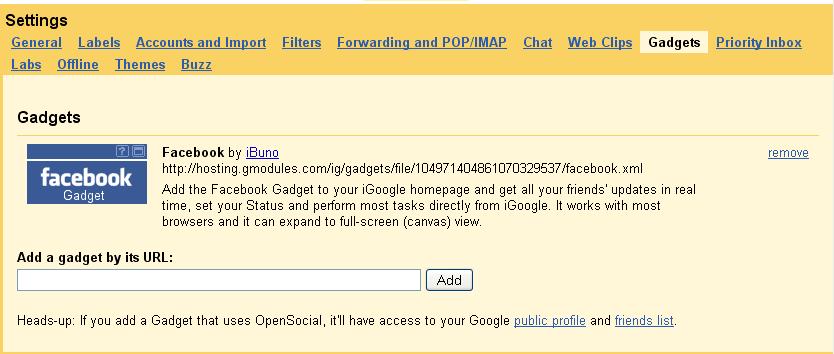
* Again go to the setting there is a tab which is made by you gadgets click on it and in URL field
write

http://hosting.gmodules.com/ig/gadgets/file/104971404861070329537/facebook.xml


* After adding the gadgets in your Gmail account facebook Ibuno is added click on it


* After clicking on it Login to facebook

* Request for the permission box open click on allow that's it you can update your facebook
status through gmail now..


* Enjoy!!!!!!

  • Digg
  • Del.icio.us
  • StumbleUpon
  • Reddit
  • RSS